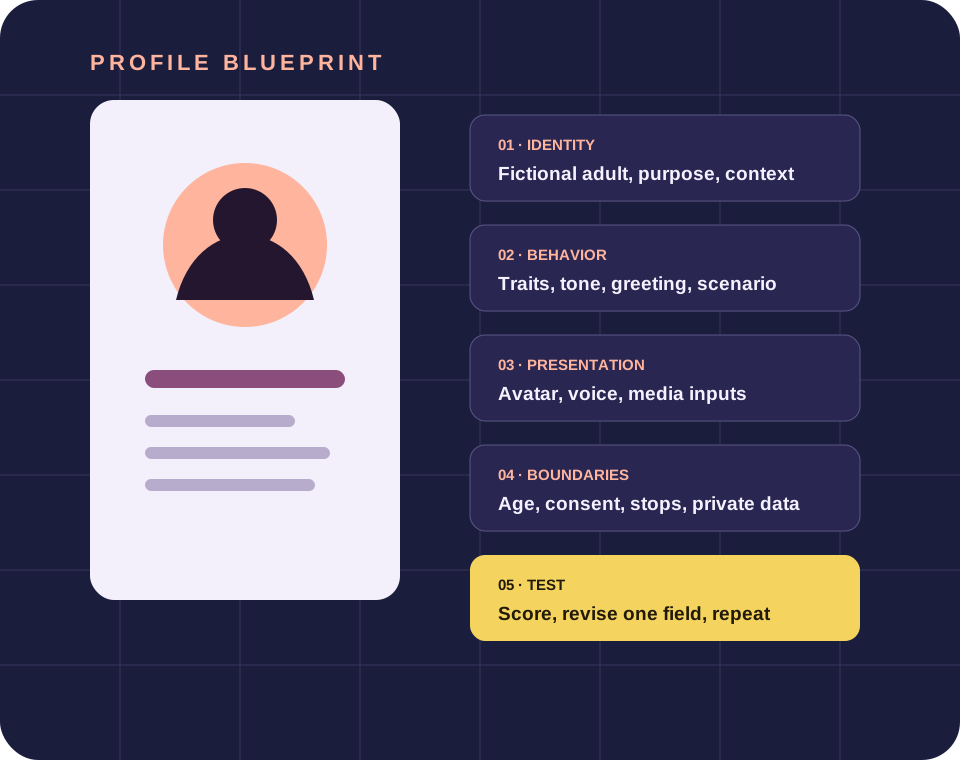
To compare creator tools using timestamped profile-field and safety evidence, write the expected profile field and the behavior it should produce before opening a creator. Keep the example fictional, adult and free of private data. Then use a short, repeatable test instead of judging the result from one entertaining response.
Why this profile question deserves its own page
A fair comparison holds the profile and scorecard steady while the creator tool changes. The narrow intent here is to compare creator tools using timestamped profile-field and safety evidence. Keeping that intent separate prevents identity, presentation and safety rules from being mixed into one vague prompt that is difficult to inspect.
A creator interface may expose text fields, sliders, media choices or presets. The labels differ across services, so start with a provider-independent specification. Record what you want the field to mean, what a passing response looks like and which outcome would make you revise or stop. This turns a preference into a decision rule without claiming the tool will behave perfectly.
Use current public documentation for available fields and policies. A public page shows what a provider says at the time checked; it does not establish every account behavior. If the live creator differs, treat the difference as new evidence and update the plan rather than forcing the older description to fit.
A repeatable five-step method
- 01
Define the field
Use the same written profile and harmless test prompts for each creator.
- 02
Reduce ambiguity
Record which identity, behavior, presentation and boundary fields are available.
- 03
Protect the fiction
Separate public provider statements from behavior observed in your own account.
- 04
Run a small test
Timestamp policy, feature and price notes because they can change.
- 05
Record the revision
Choose the tool that clears the required fields and boundaries, not the loudest claim.
Do not add sensitive details to make a test feel realistic. Fictional names, broad locations and harmless scenarios are enough to evaluate identity, speech and boundary adherence. A profile that requires real credentials, health records, precise location or another person’s intimate material is not a safer test profile.
What to check before keeping the field
The comparison uses one scorecard across every service.
Vendor claims are labeled and linked to dated public pages.
Unknowns remain unknown rather than becoming favorable assumptions.
Sponsored links are disclosed without implying endorsement or affiliation.
Score each check as clear, unclear or failed. An unclear result is not a hidden pass. Reword one instruction, rerun the same harmless prompt and compare the two outputs. If the issue involves age ambiguity, non-consensual content, real-person likeness or ignored stop rules, leave the unsafe scenario rather than escalating it for evidence.
Apply the same scorecard to Candy AI
Candy AI is included as a dated public-evidence case study, not as this publication’s owner. Review the current creator, terms, privacy policy and content-removal route directly. Features and policies can change, and a sponsored route does not turn a provider statement into our endorsement.
Explore Candy AI — sponsoredInterpret the result without overclaiming
A consistent short test can reveal whether the current output follows the written identity, tone, scenario and boundary instructions. It cannot prove future behavior, certify a service or replace the provider’s current rules. Record the date, the profile version and the exact harmless prompts so a later revision can be compared fairly.
If a response drifts, identify the smallest field that could explain it. If several fields conflict, return to the saved draft and simplify. If the tool cannot express a required adult, consent, privacy or stop boundary, that is a product-fit decision rather than a reason to invent a workaround. Keep the choice reversible and preserve an easy exit.
Sources and evidence boundary
These sources support the field design, risk control or provider statement used on this page. Vendor sources are labeled as vendor statements. Government and independent standards provide risk framing. They do not verify a private account or guarantee an outcome.
- U.S. FTC companion-chatbot inquirygovernment · checked August 22, 2026
- NIST AI Risk Management Frameworkgovernment standard · checked August 22, 2026
- CometAPI companion customization guideeditorial · checked August 22, 2026
Frequently asked questions
Does this prove a creator is safe or private?
No. Public features and policies can be reviewed, but they do not prove every system behavior, account configuration or future change.
Is this based on private account testing?
No. This guide uses dated public sources and a reproducible evaluation method. It does not present invented hands-on results.
Why change one profile field at a time?
A controlled edit makes it easier to connect a behavior change with a specific instruction while keeping the earlier draft available.